Explore EX90 features
Seamless connectivity. Smart charging. Next-generation safety. It’s advanced technology tuned for a better way to move.

EX90 Displays and connectivity
A more personal way to drive.

14.5-inch centre display
The frameless, free-standing, large 14.5-inch touchscreen display gives you an instant overview and control of navigation, entertainment, climate, in-car apps, phone, park assist cameras and other support functions. The display's size and proportions make it possible to show a large map while still showing phone, media or app windows. The display is smart too – there’s a quick control view with shortcuts to commonly used functions and a contextual bar. For example, the contextual bar will not show the control for the 360° camera until the speed is so low that you can use that function. Nothing complicated – just the information you need, when you need it.
*These images show the driver display and centre display in light mode. Only dark mode will be available for the driver display and centre display in early production vehicles and light mode may be made available via an update later.

9-inch driver display
Get driving information exactly how you want it on the 9-inch high-resolution driver display. A switch on the steering wheel lets you choose from three views. Calm shows essentials like speed, battery and range. Map adds a simplified navigation. Surround can show the cars, trucks and motorcyclists around you.
Head-up display
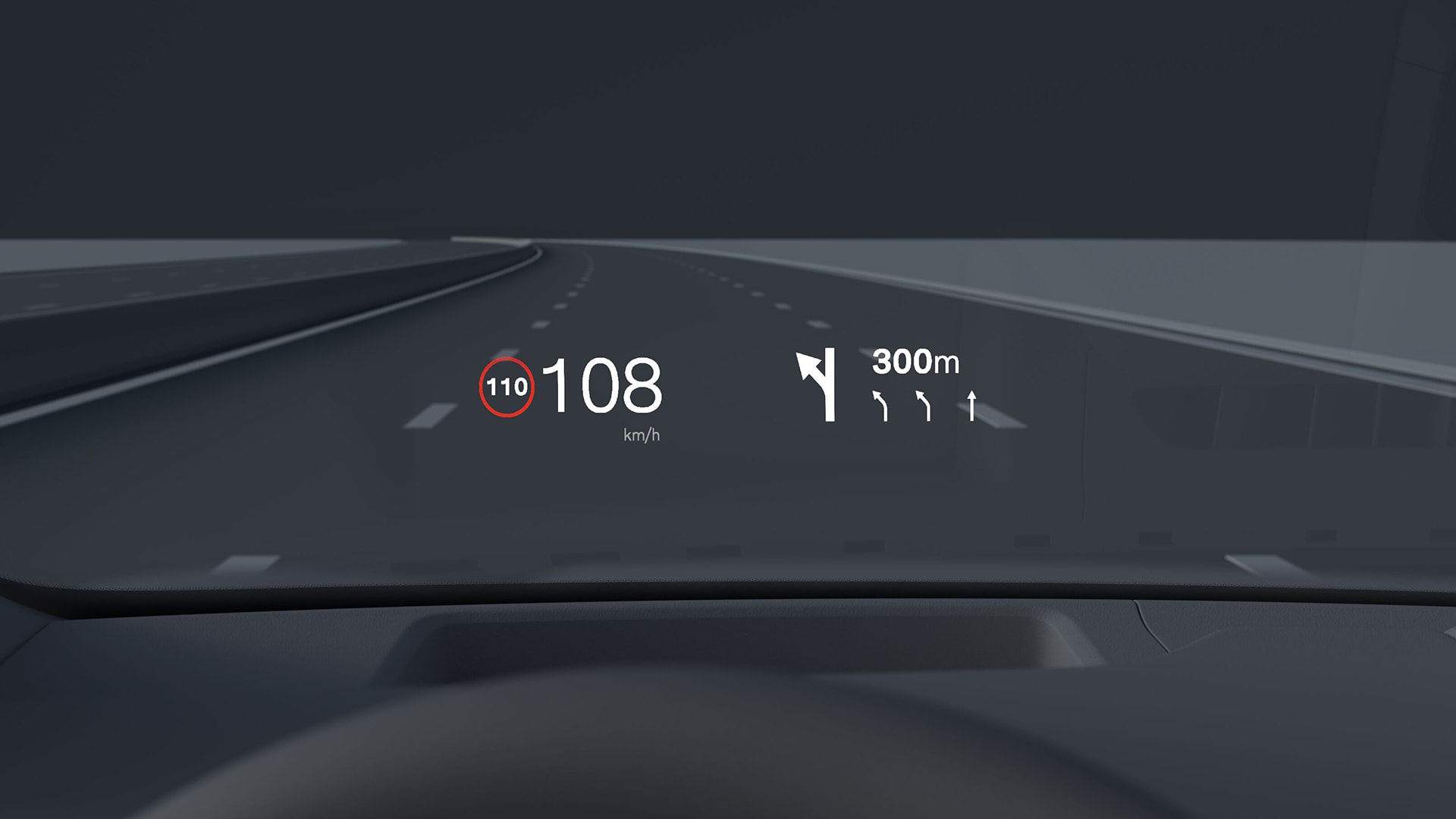
The large head-up display presents vital driver information so it appears in your field of vision at a distance that's comfortable for your eyes. You can keep your eyes on the traffic at the same time as you see actual speed, speed limits, navigation directions and more. You don't have to change focus or look down, which provides less strain on the eyes. The brightness of the head-up display adapts automatically to the light conditions, and you can set the system to suit your own personal preferences.

Intuitive interface
Feel more in control behind the wheel with a centre display that connects you to what’s happening inside and outside the car.
The vertical orientation shows more of the route ahead, making navigation easy to follow. Its interface is designed to keep your focus on the road with smart widgets to manage key functions and contextual shortcuts that pop up as you need them, like the 360° camera when parking. The large display can also show navigation and app windows side by side, so you can view both at a glance.

Google built-in
Personalise your drive with Google built-in, a range of helpful apps available with unlimited data as part of your free digital services package.
Google Maps
Find the best route to your destination with Google Maps. It's simple in-car navigation that reroutes you based on the latest traffic updates.
Charging station locator
Google Maps can help you plan the most efficient route for your electric car. It can also locate nearby charging stations. Filter by speed, price and payment options.
Google Play
Download the apps you love to bring your favourite music, podcasts and audiobooks on every journey.
Google Assistant
Say “Hey Google” to adjust climate settings, call and text, play audio and more using just your voice.
Smart home control
Control compatible devices in your home from your car. Now, you can adjust the lights, set the temperature and more when you’re out and about.
Digital services
Use Google Maps, Google Assistant and any app downloaded on Google Play Store with unlimited data for five years. This digital services subscription is included with the purchase of a new Volvo car. After this period ends, new terms and fees will apply if you choose to renew. Fair Use Policy for data applies.

Core computing
Our advanced core system HuginCore includes one powerful Nvidia® Orin X core computer and a dedicated infotainment computer for ultra-fast data processing, robust over-the-air updates and a seamless user experience. The core computer technology also allows real-world data collection for continuous improvement of the car and its driver support and safety systems. This also reduces weight and energy consumption.
Over-the-air updates (OTA)
Over-the-air software updates enable remote updating of different car features and functions via the cloud. This makes it easy to install new software-based functionality so that you can enjoy a car that gets better all the time. And you don't have to visit a workshop to ensure that your car is always updated with the latest car-related software. The software updates are distributed on a regular basis via the cloud to the car and are free of charge. Via over-the-air updates, you can also complement your Volvo with new software-based optional packages and functions – whenever you want. Just using the car app, you can easily schedule the updates at times that suit you best.
Please note: Availability of Over-the-air updates (OTA) may vary based on market.

Digital key plus
Store the digital key securely in your digital wallet. Then all you need to unlock and drive your Volvo is to carry your iPhone, Apple Watch or a compatible Android device with UWB (Ultra Wideband) capability. The car recognises your device and grants access as you approach – just open the door, take your seat, and drive away while keeping your smartphone in your bag or pocket. The car can also lock automatically as you walk away. Additionally, the digital key makes it easy to share the car with friends and family – simply send an invitation to the person you wish to share access with via your digital wallet.
Please note: Requires eligible device and OS version. See here for details: https://support.apple.com/en-us/HT211234 https://www.android.com/digital-car-key/

Volvo Cars app
Get more from your car with the free Volvo Cars app. Use it to remotely access your car, activate climate functions, update car software and more.
Easy access
Unlock your car in the app or use it set up a digital key. Can’t remember where you parked? Locate your car on a map, honk the horn or flash its lights.
Climate settings
Warm or cool the cabin before you get in. Heat seats and the steering wheel, too. You can also run a purification cycle to refresh cabin air before your journey.
Charging controls
See charge level and range at a glance. Find nearby charging stations. Schedule charging times and confirm charging status.
Convenient updates
Get notifications when updates are available for your car's software-based features. Tap to start the update or schedule it for a more convenient time.
In-car communication
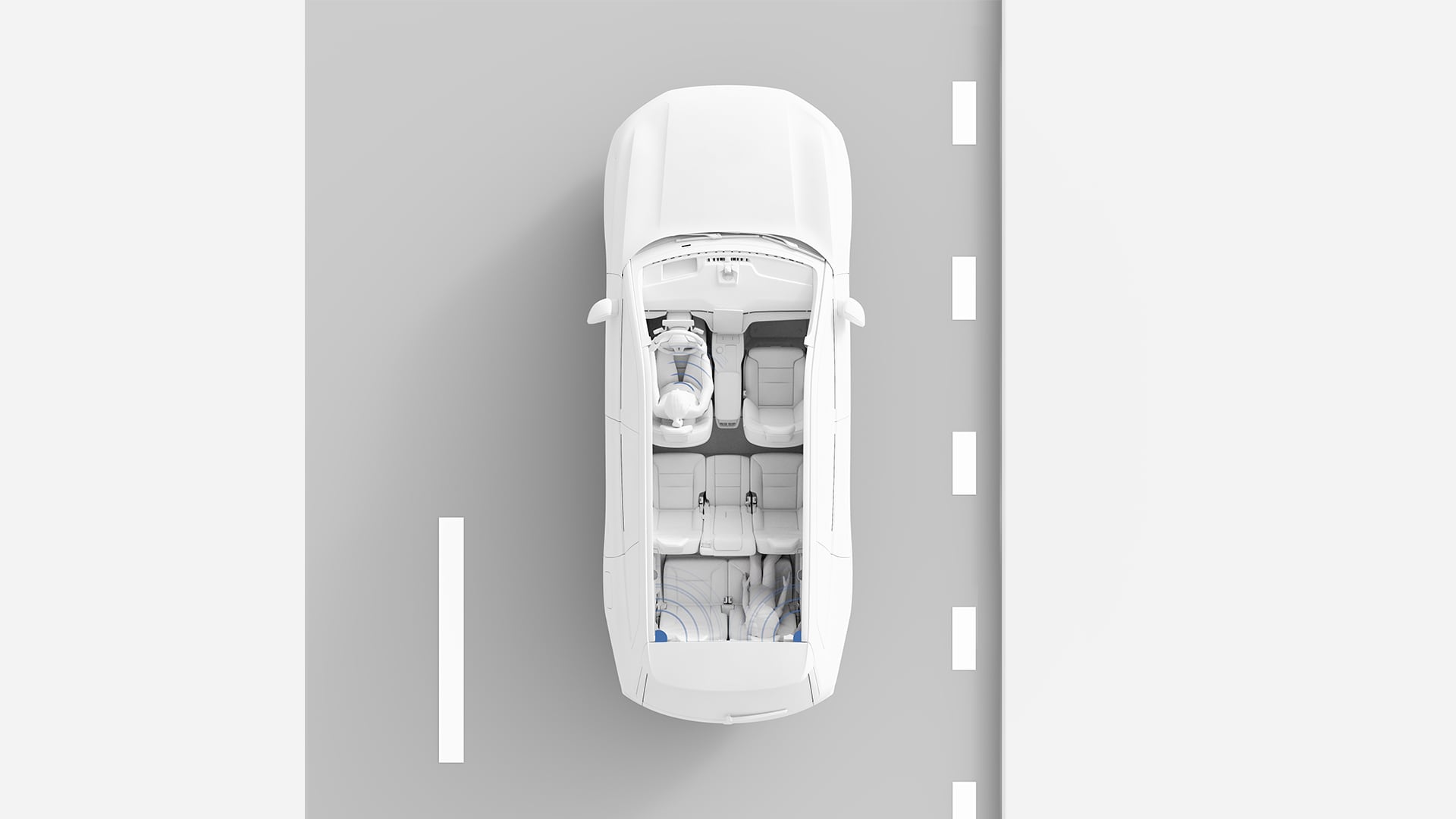
Using voice amplification and built-in microphones, you can converse effortlessly with rear seat passengers without losing your focus on traffic. Passengers in the second and third rows can hear you through the car's audio system, which adjusts volume automatically. Speak naturally without losing focus on the road, even at high speeds or with music playing. Three sound settings (low, medium, high) adapt the overall volume to your needs, including for hearing impairments. With Bose Premium Sound or Bowers & Wilkins High-Fidelity audio systems, rear microphones enable easy communication between front and back seats. Control voice amplification from the centre display.
Wireless Apple CarPlay
Wireless Apple CarPlay makes it possible to integrate an iPhone® with your Volvo. It gives you convenient in-car access to your favourite iPhone apps to navigate, make calls, receive messages and enjoy music while you drive. The voice control via Siri is specially adapted for driving. You can also control Apple CarPlay conveniently from the center display.
Apple CarPlay and iPhone are trademarks of Apple Inc. Wireless Apple CarPlay is compatible with an iPhone 6 or newer models running iOS 14 or later. Update to the latest software to optimise your Apple CarPlay experience.
EX90 Comfort and climate
A restorative atmosphere for everyone onboard.

Quiet cabin
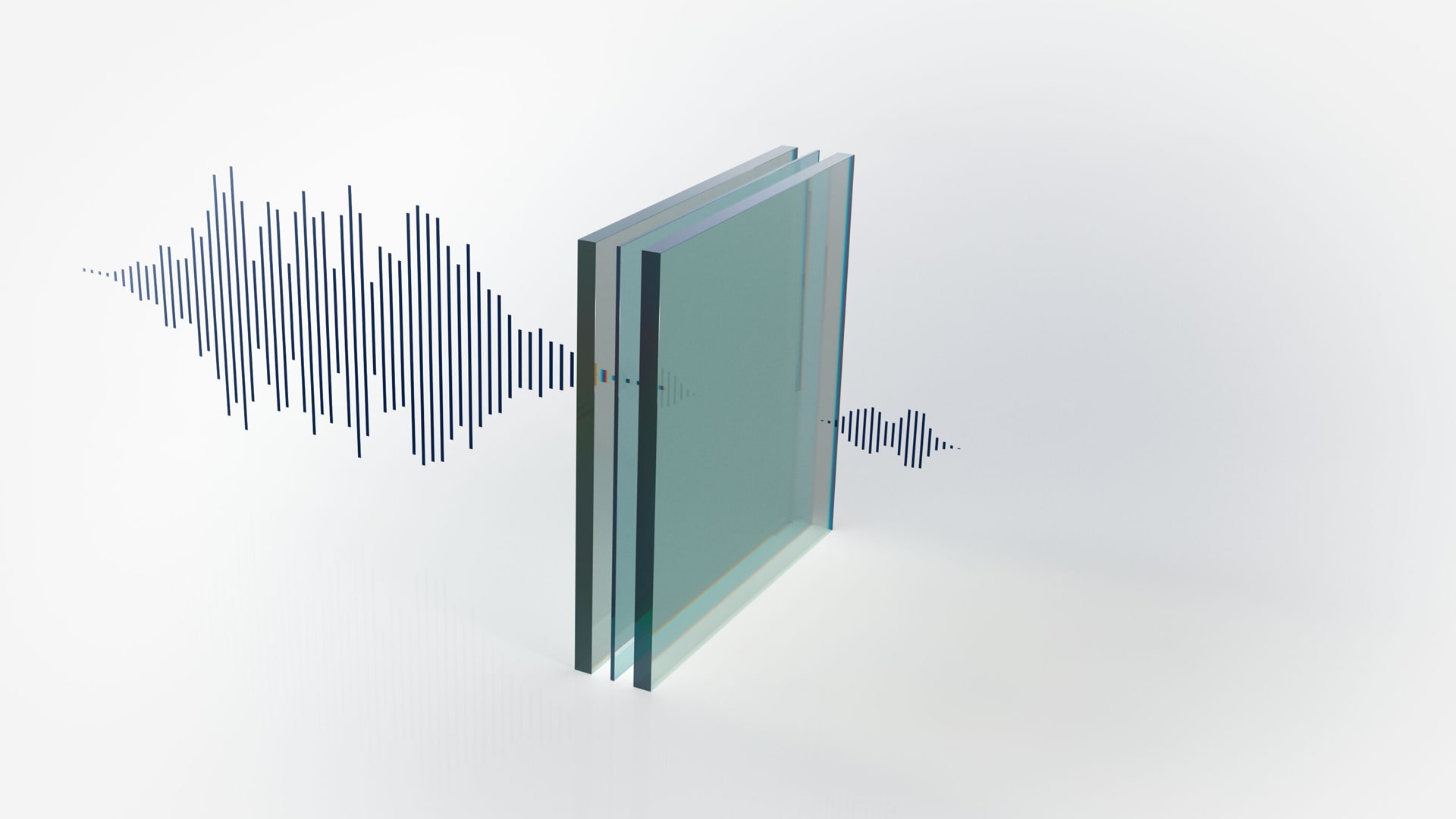
Enjoy clear conversations, tranquil commutes and crisp audio in an SUV engineered for quiet. State-of-the-art soundproofing and extensive design efforts help minimise outside noise and vibration. Enhance the serene atmosphere of your cabin further by selecting laminated windows.
Laminated side and rear windows
Laminated windows for the cabin and load compartment help reduce noise from the outside so that you and your passengers can enjoy an even quieter ride. They can also enhance your security as the windows’ high resistance to external force makes it hard for a thief to break into your car. For your comfort, they also contribute to reduced UV radiation inside the cabin.
Ride comfort
Enjoy a relaxed command of the road thanks to the advanced chassis with Frequency Selective Damping technology. It adapts how the shock absorbers behave in response to detected road conditions. Whether navigating bumpy or winding roads or towing a trailer, you’ll experience stable handling without compromising comfort.
Opt for the active chassis with rear air suspension for added comfort. The system adjusts ride height and stiffness and continuously monitors the car, road and driver, adapting 500 times per second for precise cornering and reduced pitch and roll.

Multi-zone climate controls
The four-zone climate system allows the driver, front passenger and two outer rear passengers to set their own temperature and fan speed. If no one is detected in the third row, that zone will switch off to save energy.
Use the Volvo Cars app to bring the cabin to a comfortable temperature before getting in. You can also warm the seats and steering wheel or defrost the windscreen ahead of time. Pre-conditioning the cabin includes an air cleaning cycle, delivering a refreshed interior each time.
Air purifier and remote cabin pre-cleaning
Fine particulate matters (PM 2.5) are a health impairing air pollutant. By efficiently helping to reduce or eliminate the levels of PM 2.5 inside your Volvo, our air purifier significantly contributes to a clean cabin environment. This advanced technology traps these extremely small particles in a filter and can stop up to 95% from entering the cabin. The levels of PM 2.5 particles in the cabin are constantly being monitored by an optical sensor and shown in the centre display. You can also compare the PM 2.5 levels in the cabin with those outside the car. Using the Volvo Cars app, you can even pre-clean the cabin air and access information on interior air quality before entering the car.

Child locks and seats
Child seats can be installed in the second row outer seats with ISOFIX anchorages in the outer positions.
Integrated booster cushion
When your little ones outgrow their child seats, they can transition to the built-in booster cushion in the middle seat of the second row, which supports a proper seatbelt fit.
Power child lock
An electronic child safety lock lets you control the rear doors and windows directly from the driver's seat.
Child safety recommendations
Our approach to child safety includes rigorous testing based on real-life traffic situations. That's why we strongly recommend keeping kids in rear-facing child seats until they’re at least four years old.
Electrochromic panoramic roof
Electrochromic glass technology allows you to adapt the shading of the panoramic roof depending on solar light intensity. This electronic sunshade helps to protect occupants from disturbing sunlight, which increases comfort while also increasing privacy. At the touch of a button in the centre display, the glass switches quickly from clear to opaque using electrical voltage.
Wireless phone charger
Place your phone on the charging pad at the front of the tunnel console. It fits larger phones and delivers up to 15 watts – perfect for quick top-ups.
Up to six USB-C ports
Charge your phone wherever you're sitting in the car with two USB-C ports in each row of the cabin.
Power outlet
Use an electric cooler, air mattress pump or camping stove on the go with the 12-volt power outlet in the boot.

EX90 Safety and driver support
Because we all have precious cargo. []

Protective safety
The body of your EX90 is designed to help provide 360° protection in the event of an accident. A high-strength steel safety cage surrounds everyone in the car, working with front, rear and side deformation zones to absorb and redistribute the force of an impact. For added security, the battery is shielded by its own safety cage.
In the event of a side collision, the Side Impact Protection System™ is designed to help distribute crash forces across the car’s body. This helps limit intrusions into the cabin and reduce the risk of injury to passengers. A long airbag along the roofline deploys in milliseconds to help provide head protection for passengers in the front and rear outer seats. It also helps shield against debris like broken glass from side windows. Seatbelts tighten to help keep front passengers securely positioned and airbags in the front seats are deployed to help protect the chest and lower body.
If the car leaves the road during an accident, the front seatbelts tighten to hold you in place. The front seats are designed to help protect your spine during heavy landings. And in case of a rollover accident, the restraints deploy automatically. Combined with the strong safety cage, these features work together to help protect everyone inside.

Driver Understanding
Sensors and a touch-sensitive steering wheel analyse patterns in your eye and head movements, along with your driving style. Driver Understanding uses this information to adjust the timing of warnings and interventions, giving you the chance to respond to potential risks and stepping in only when needed.
But on days when you’re not at your best, the car can provide extra support. Like if it detects signs of drowsiness, it may suggest a break. If your steering is not up to its usual standard, it can gently help you stay in the lane. And if you don’t respond to escalating alerts, the car can bring itself to a stop and activate the hazard lights.

Occupant Sensing
Get a reminder if someone is inadvertently left behind in the car. Radar sensors throughout the cabin enable our occupant sensing system to detect sub-millimetre movement. If your EX90 detects a person or animal inside the car when you try to lock the doors, it can stay unlocked and notify you to check the interior. The climate system can remain on to improve comfort and reduce the risk of hypothermia or heatstroke.
Door opening alert
Avoid unforeseen accidents when opening the doors of your parked car. The radars on the rear of your Volvo car can detect approaching cyclists and motorists from behind and alert anyone in the car who might be about to open their door. Your car can send you alerts in two stages. Initially, a warning light on the corresponding door mirror can illuminate. If a collision is imminent, the light can begin flashing with a warning sound.
Pilot Assist
Pilot Assist supports relaxed yet focused driving from a standstill up to 150 km/h. Keep your hands on the wheel as it gently adjusts steering, braking and acceleration. It can even read road signs and automatically adjust your speed to match the limit.
Lane changes are smooth, too. Turn on your indicator, and Pilot Assist can guide the car through the manoeuvre with steady steering support.
High Definition Pixel headlights
Light up the night without dazzling other drivers. The advanced High Definition Pixel headlights in the EX90 use 1.3 million pixels that change the light pattern according to what’s on the road. Working with the car's front cameras, they can detect up to five cars and three other objects at once. The light pattern automatically adjusts to help reduce glare while keeping your visibility clear.
360° camera with 3D view
Get in and out of tight spots with the optional 360° camera with 3D view. Use the split-screen option on the centre display for a near-180° front or rear view for better visibility. When reverse parking, the rear-view camera shows guiding lines to help you ease into place. Pinch to zoom in, especially while attaching a trailer.
Safety features complement safe driving practices and are not intended to enable or encourage distracted, aggressive, or otherwise unsafe or illegal driving. Cross traffic alert may have limited functionality in certain situations. Driver support functions are not a substitute for the driver's attention and judgment. Ultimately, the driver is responsible for the safe operation of the vehicle at all times.
EX90 Charging solutions
Take charge in a new direction.

Range optimisation
Get an overview of your energy usage with the Range Assistant. It estimates how far you can go based on your current battery level in real time and factoring in driving style, road conditions and cabin climate settings. Check both minimum and maximum range estimates to plan with confidence.
The Range Assistant can also make suggestions to help you go further on a single charge, like adjusting cabin climate settings, driving mode or pre-conditioning the battery. Access it through the centre display.

Battery pre-conditioning
When you navigate to a fast-charging station using Google Maps, your EX90 automatically prepares the battery to the optimal temperature. This ensures faster, more efficient charging - with no extra steps needed. You can also activate pre-conditioning manually from the center display.
Explore EX90 further

Information and photographs on this website may include overseas models and features not available in Australia. Please confirm exact specifications, features and availability with your local Volvo retailer. Google services are enabled through the Digital services package which is included for five years. After this period ends, new terms and fees will apply if you choose to renew. Fair Use Policy for data applies. Subject to network availability.