Activating Pilot Assist
You activate Pilot Assist by pressing the driver support control on the steering wheel while driving.
When driving, a gray Pilot Assist symbol in the instrument panel indicates that the function is available but not yet activated. The symbol changes depending on whether steering assistance is enabled in driving settings or not.
 | Pilot Assist with steering assistance is off but available to activate if all conditions are met. |
 | Pilot Assist without steering assistance is off but available to activate if all conditions are met. |
Important
Before using Pilot Assist
Take the time to read everything about Pilot Assist in this manual before using it for the first time. Understanding its capabilities and limitations is important for safe use.
Assess the situation
Make sure the traffic situation and conditions are suitable for activation. Wait until you complete any ongoing maneuvers, such as a lane change, before activating Pilot Assist.
Activating Pilot Assist when driving
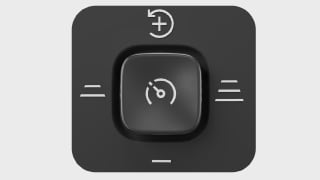
Press the driver support control
 on the steering wheel once.
When Pilot Assist is activated, you will see a symbol in the instrument panel.

Pilot Assist is active. The first time you activate Pilot Assist during a drive, your speed at the time of activation becomes the set speed.
When Pilot Assist is active, you can adjust the target speed by moving the driver support control upwards or downwards on the steering wheel.
Tip
Resuming Pilot Assist
If you recently used Pilot Assist and you want to use your previous target speed, move the driver support control upwards towards the resume symbol
on the steering wheel.