Adjusting air vents
You can adjust the front and rear air vents.
You can adjust the front air vents via the center display. They can be adjusted manually or you can select an air vent mode with a predefined airflow direction.
The rear air vents are manually adjusted via the physical air vent knobs.
 | Manual air vent mode | You can manually move the airflow in any direction. Press the air vent you want to open or close. |
 | Focus air vent mode | Airflow is directed towards the body. |
 | Away air vent mode | Airflow is directed away from the body. |
 | Auto air vent mode | The climate system automatically controls the airflow direction. |
Manually adjusting the front air vents
- Press the fan symbol
 in the bottom bar.
 - If you are in manual climate mode, you also need to make sure the upper body air vent symbol
 is selected.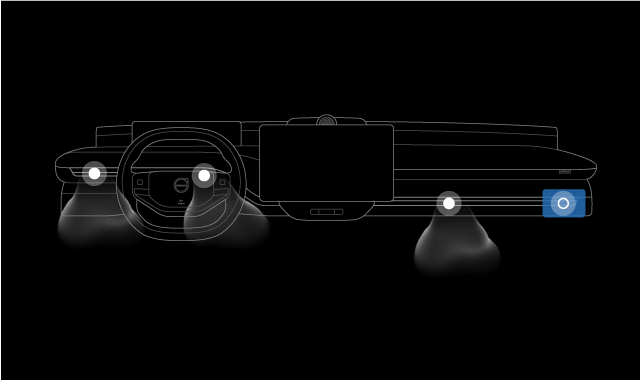
To manually change the airflow direction via the center display, move the air vent in the direction you want the air to flow in. You can open or close an air vent by pressing the air vent.
Tip
You can also adjust where air is distributed from by selecting the air distribution symbols. These include the lower body air vent symbol
 , the upper body air vent symbol and the windshield air vent symbol
  .
.If you are in auto climate mode, selecting an air distribution symbol will change the climate mode to manual.
Changing air vent mode
- Select an air vent mode to change the airflow direction.The airflow direction is adjusted.
Adjusting the rear air vents
- Adjust the rear air vents via the physical knobs to redirect the airflow.